Class booking software for South Africa

The class booking app for South African studios and gyms.

It takes care of itself, so you can get back to teaching. Members book and pay on their phone, whenever it suits them. You see every class and every Rand at a glance. And the app carries your studio's name, logo and colours, not ours.

Built in South Africa, with card payments in Rand through Paystack. It works in any web browser on a phone, tablet or computer, and iOS and Android apps are on the way.

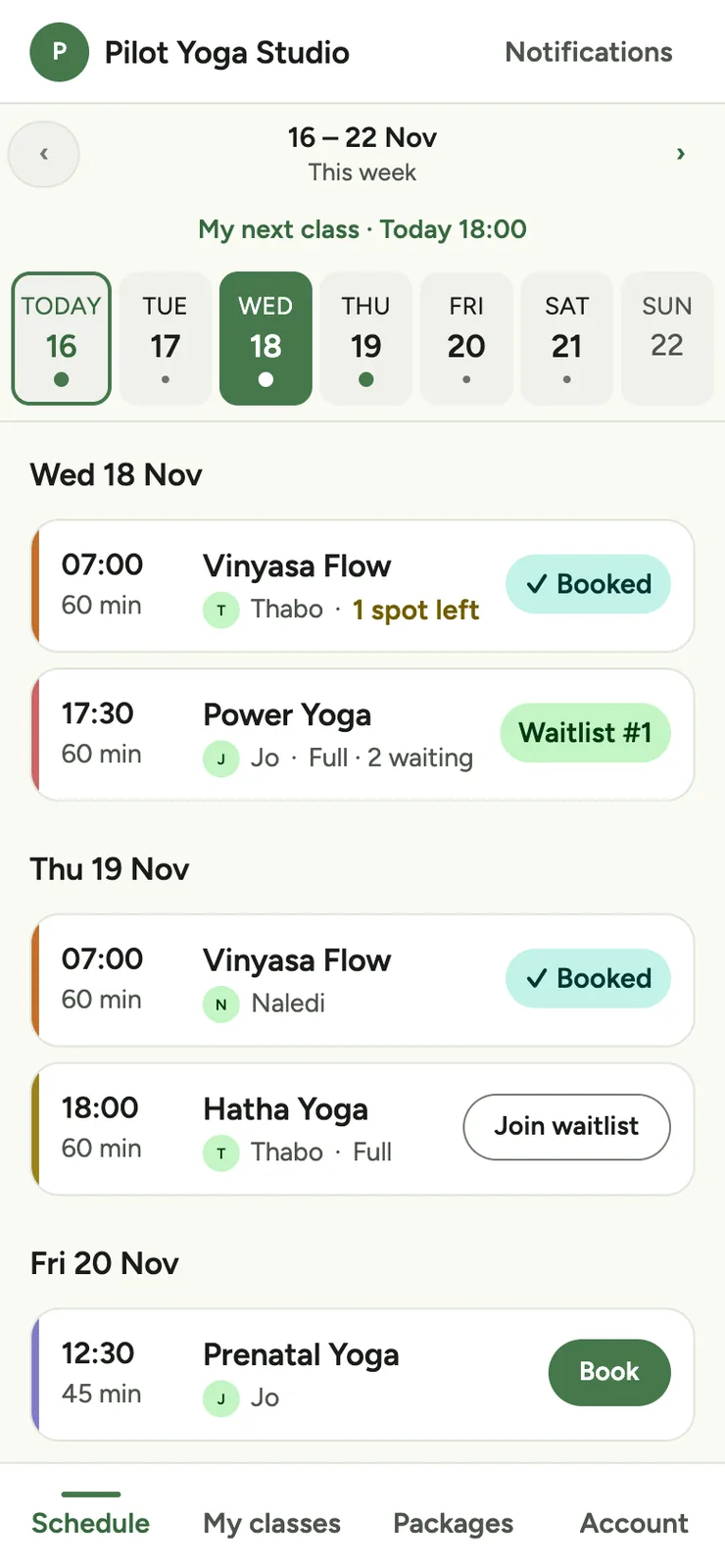
Classy schedule on a phone: one week with a pill for each day and dots on class days, a “My next class” line, then class cards marked Booked, Waitlist, Join waitlist or Book.

Booking software for any studio, gym or class with a timetable

Classy in 30 seconds

Take a quick look around

A short tour in seven scenes that plays on a loop. A member books a class on their phone in a few taps and gets confirmation straight away. They pay for a pack once, and Classy counts every class. The studio runs its timetable and sees what it earned each month, all in its own name, logo and colours. The last scene has a button to book a demo. Use the controls to pause, play or step through the scenes.

  1. Members book a class in a few taps.

  2. No messages back and forth.

  3. They pay once, and Classy counts every class.

  4. You run the timetable. Members do the rest.

  5. See exactly what you earned, every month.

  6. Your name, logo and colours, not ours.

  7. Less admin, more time for your classes.

    Book a demo

What you get

The admin, handled

No more WhatsApp lists or “is there still space at six?” messages. Classy keeps track of who's in each class and what you've earned, so you don't have to.

Bookings

Members book their own classes

Add your classes to the timetable, and members browse, book and cancel on their phone. A class can never be overbooked, so nobody turns up to find there's no space for them.

  • Set up weekly or one-off classes with a class size and an instructor, then edit or cancel them whenever you need to. You'll see who's booked into each class, and you can add or remove people yourself.
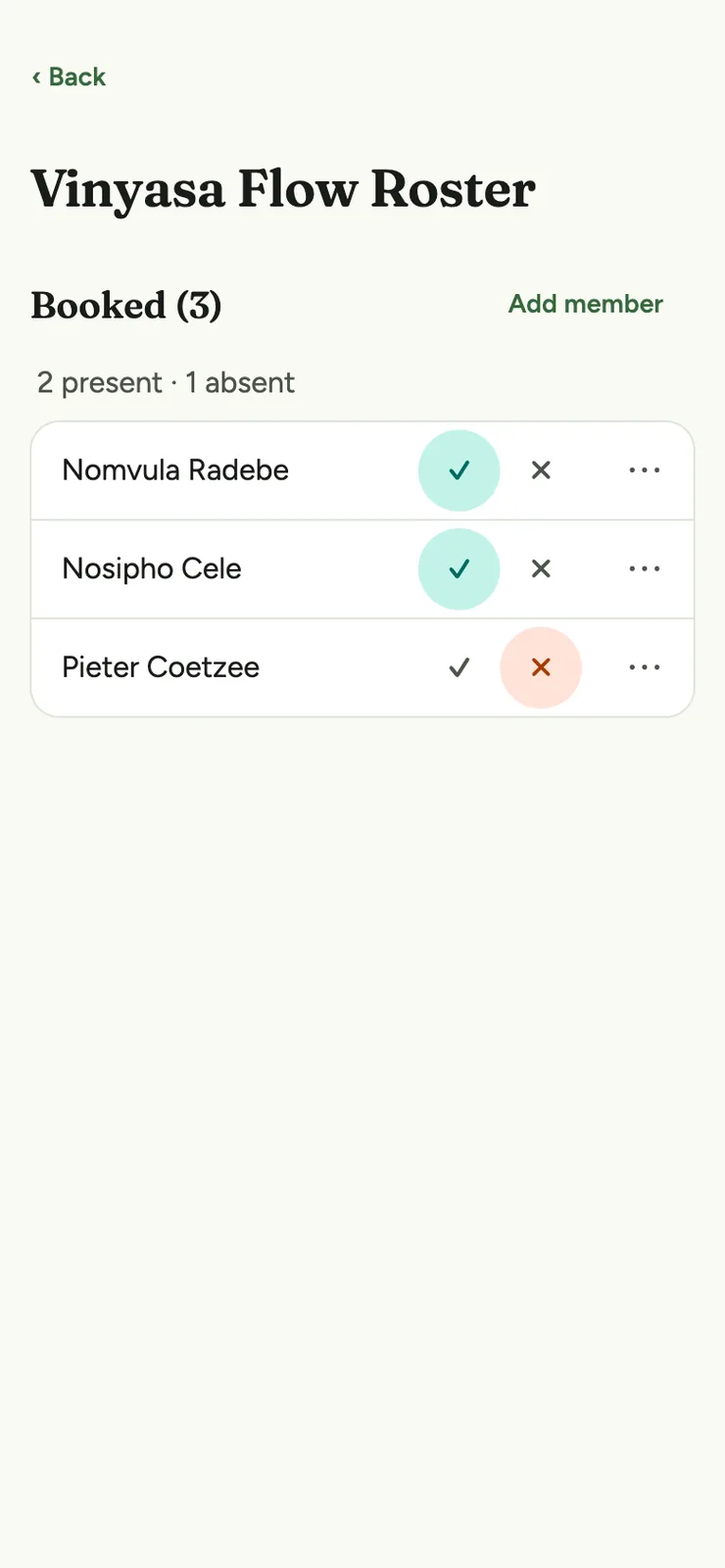
  • On the day, mark who came from the class screen, and add walk-ins on the spot. A walk-in uses one class from their pack. If a member on an unlimited pack keeps missing classes, owners and admins get an alert in the app.
  • When a class fills up, members can join the waitlist. When a spot opens up, Classy books the next person in automatically, in queue order, right up to your last call. After that, the spot is open to anyone, first come first served, and everyone still waiting is alerted in the app and by email.
  • You set the rules, like how far ahead members can book, when bookings close, your cancellation cutoff and your waitlist last call. Classy applies them the same way for everyone.
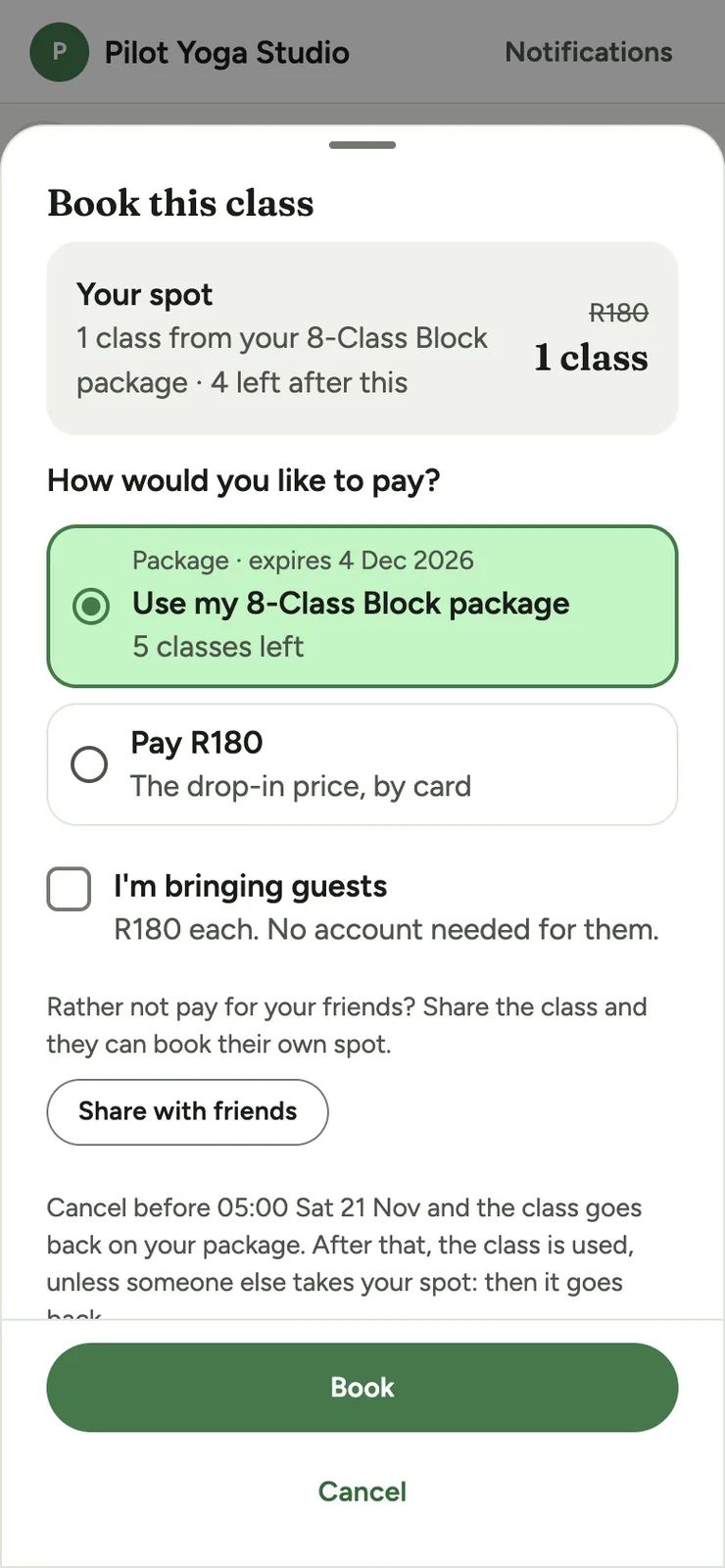
  • One checkout shows every way to pay for that class: a pack they already have, or, if you take card payments, the drop-in price by card for just that class. The cancellation rule is shown in a plain sentence, with the real deadline, before they confirm. If they need a pack, they buy one and land straight back on the class to finish booking.
  • Bring a friend, if you switch it on. Members can book guests onto a class and pay the drop-in price per guest by card. You set the most guests per booking, and you can give members on unlimited packs a guest discount.
  • If a member cancels after the cutoff and the class fills up again before it starts, for example from the waitlist, they get their class back automatically, and are told so. This applies to class packs, not unlimited ones.
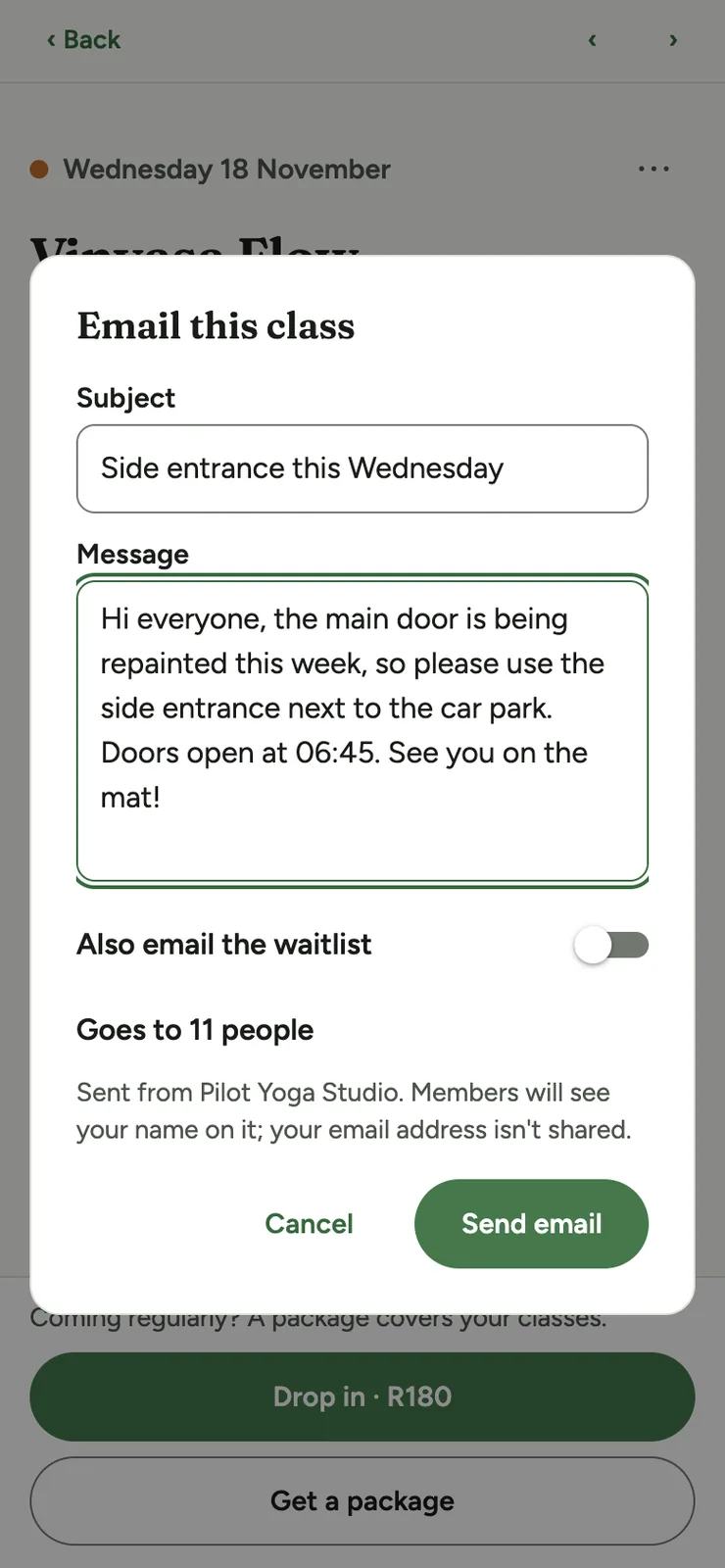
  • Need to tell people a class has moved or the instructor has changed? Owners, admins and instructors can email everyone booked into a class, or into all of a day's classes, and the waitlist too if you like. The email comes from your studio and names who sent it.
  • Members agree to your waiver the first time they book or join a waitlist, and each agreement is logged with the time. Use our standard South African template, your own text or a PDF.
A class on a phone, with its time, instructor, Map and Add to calendar links, description, spots left, the free-cancellation time, the class it uses from the member's pack, and a Book button.
What members see
The Book this class sheet on a phone: use a pack or pay the drop-in price by card, an option to bring guests, Share with friends, the cancellation rule and a Book button.
Pay or use a pack
A class roster on a phone, with each booked person marked present or absent and an Add member button.
Who came

Payments

They pay once. Classy counts every class.

Say goodbye to punch cards and counting classes in a spreadsheet. You sell class packs, like a 10-class pack or a monthly pack. Members can pay online by card through Paystack, and your share goes straight into your bank account. Or they pay you in person or by EFT, and you approve the pack with one tap.

  • When a member books, one class comes off their pack. If they cancel before your cutoff, they get it back. After the cutoff, it counts as used.
  • Packs can expire after a set number of days. Once a pack has expired or run out, it can't be used to book.
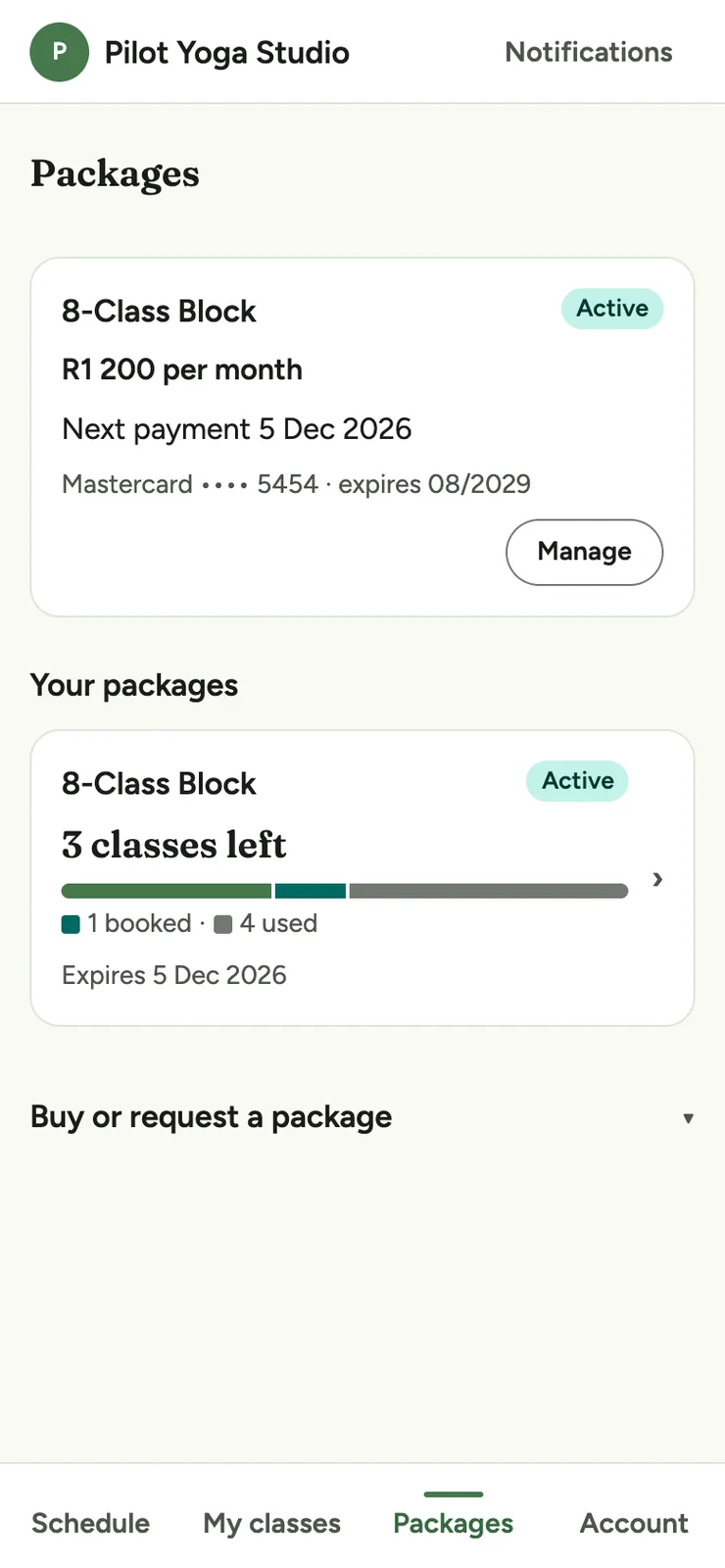
  • You and your members both see the classes left, booked and used, so nobody has to keep count.
  • Members can also pay monthly. Their card is charged automatically, they can cancel in the app, and if a payment fails Classy tries again and lets them know.
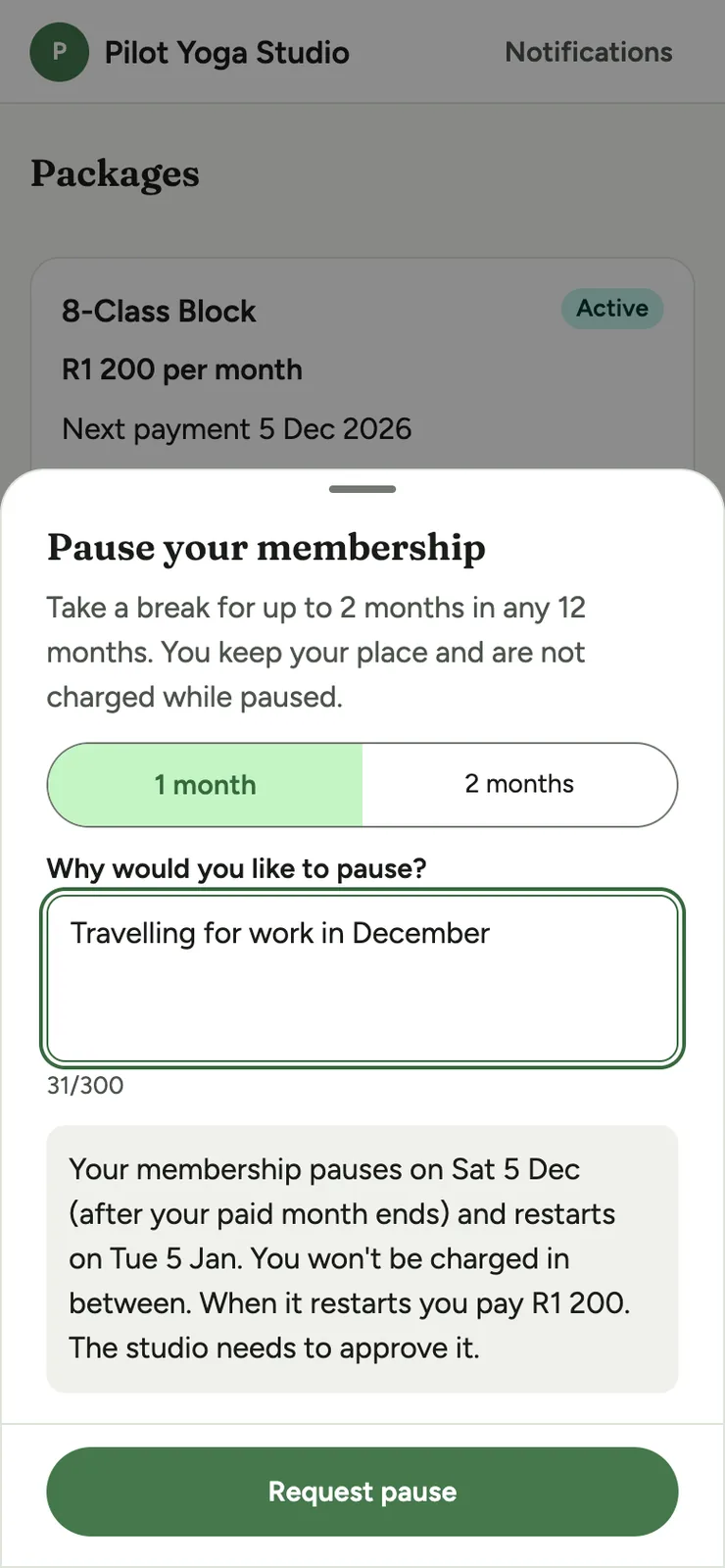
  • A member can ask to pause their monthly membership for one or two months, and you approve or decline it. Nothing is charged while it's paused, and it restarts on its own. It's limited to two paused months in any 12.
  • Members can choose when a pack starts, up to 60 days ahead, so a pack bought before a holiday doesn't run down while they're away.
  • Each pack shows how much it saves per class compared with the drop-in price, like “R20 off every class”.
  • If you like, switch on a free first class for new members. They get it automatically when they join, once per person.

We switch on online payments studio by studio, and we'll set them up for you. Monthly payments need online payments to be switched on.

The class packs screen on a phone, with a member's active pack and classes left, and the packs they can buy, each with its price per class and how much it saves.
What members buy
The Packages screen on a phone, with a member's monthly subscription, its price, next payment date and card on file, a Manage button, and the pack with classes they have left.
Paying monthly
The Pause your membership sheet on a phone: pause for one or two months, a reason, the pause and restart dates, a note that the studio approves it, and a Request pause button.
Pausing a membership

Income

Know exactly what you earned

When the month ends, the sums are already done. Owners and admins get a Reports screen for every month, showing exactly what came in.

  • Online card sales are shown separately from in-person sales, which are split by method: cash, card, EFT, QR code or free.
  • Sales are broken down by pack too, so you can see which packs people buy.
  • For every month with sales, we email your owners and admins a PDF and CSV statement, handy for your bookkeeper.
The Reports screen on a phone: a month's total sales, online card sales with the payment and Classy fees and the net due, offline sales by method, and sales by package.
What you see

Also included

And all the little things

  • Team roles and class lists

    Owners, admins and instructors each get just the access they need. Instructors see who's booked into each class, mark who came, and add or remove people themselves.

  • Your own class packs

    Add, edit and retire your class packs yourself, and choose which ones are offered monthly. Members are emailed before a monthly price changes.

  • Member search and history

    Look up any member to see their packs and class history.

  • Notices to members

    Post a notice when the timetable changes or you have news to share. Members get notices in an in-app inbox as well as by email.

  • Waivers

    Publish a waiver from our standard South African template, your own text or a PDF. The members list and class roster flag anyone who hasn't agreed, and you can record a paper signature.
  • Admin on your computer

    On a laptop or desktop, your admin keeps its desktop layout: a sidebar, an overview dashboard, a members table you can search and sort, a week calendar for classes, and reports you can export to CSV.

  • Your branding

    The app carries your name, logo and colours, and you choose your heading font too. We set it all up for you.

  • Shareable class pages

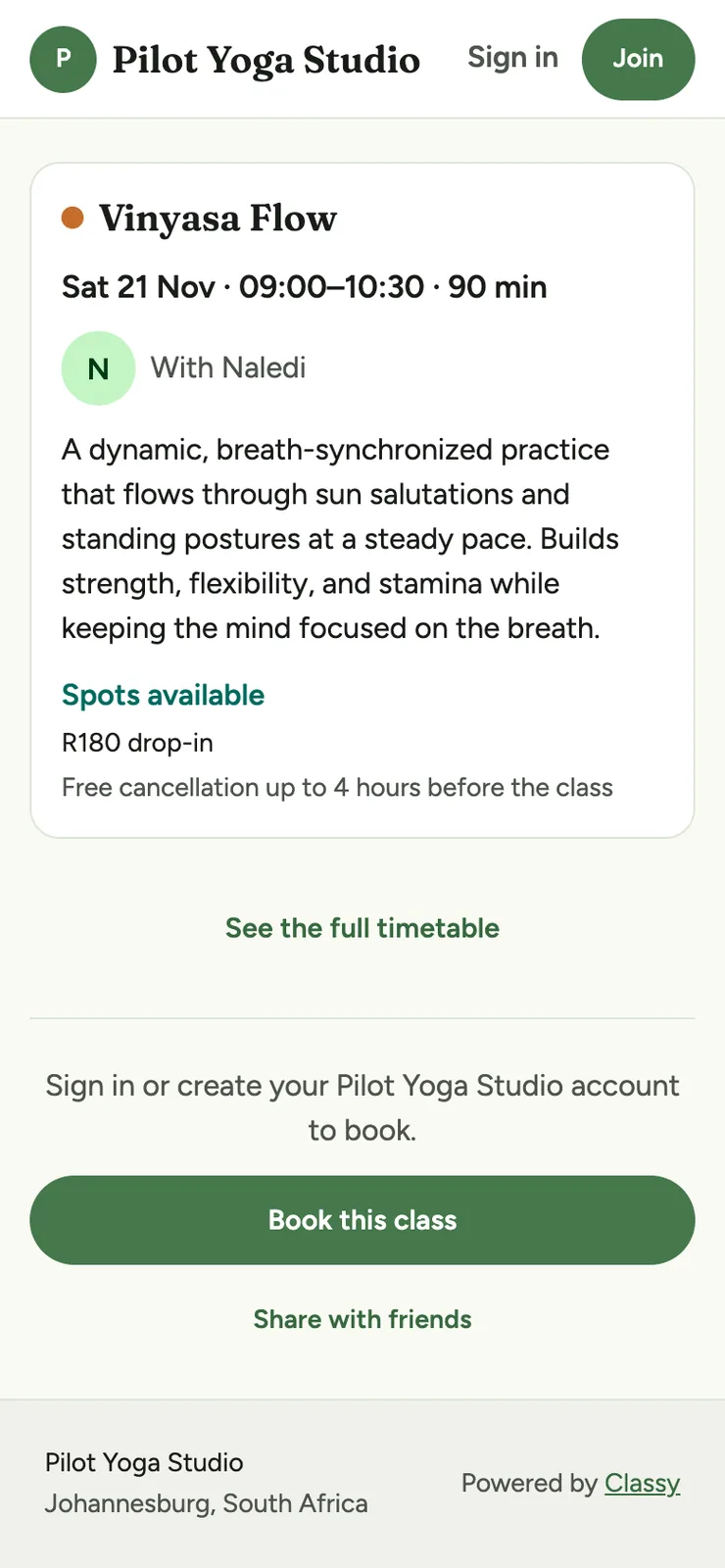
    Besides your public timetable, every class has its own page you can share. Visitors see the time, instructor and how full it is, and can join and book right there. Links show a proper preview card in WhatsApp, and the pages are set up for Google to find.

  • Email a class

    Email everyone booked into a class, or into all of a day's classes, when something changes. It comes from your studio and names who sent it.

  • First class free

    Switch on a free first class for new members. It's given automatically when they join, once per person.

  • Separate studios

    Your classes, members and payments are kept completely separate from every other studio.

  • No passwords

    Members sign in with a 6-digit code sent to their email, worded so their phone offers to copy it. There's no password to forget.

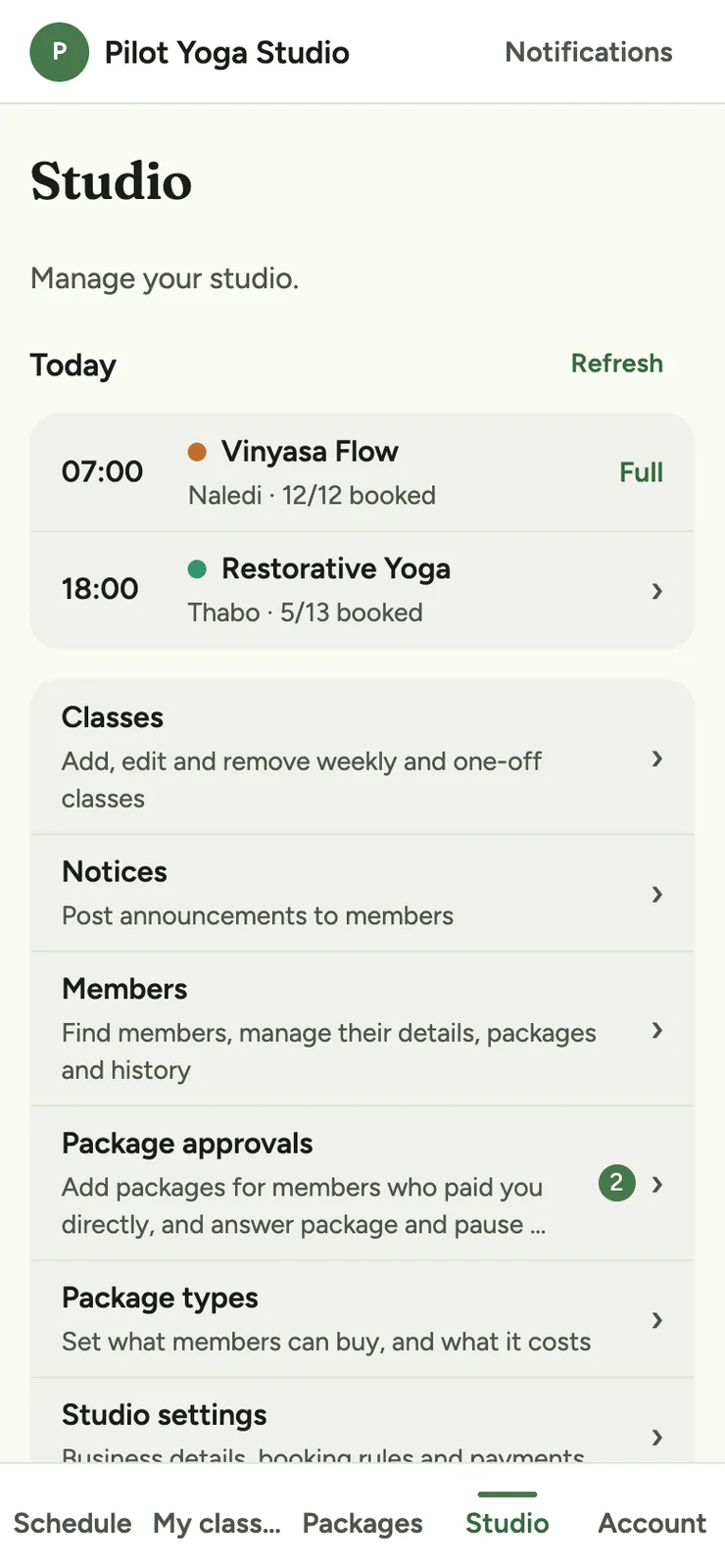
The studio hub on a phone, listing today's classes, then links to classes, notices, members, package approvals, package types and studio settings.
Your studio hub
The Classes screen on a phone, with Class types, Closures and New class buttons, Weekly and Upcoming tabs, and the weekly class list.
Your classes
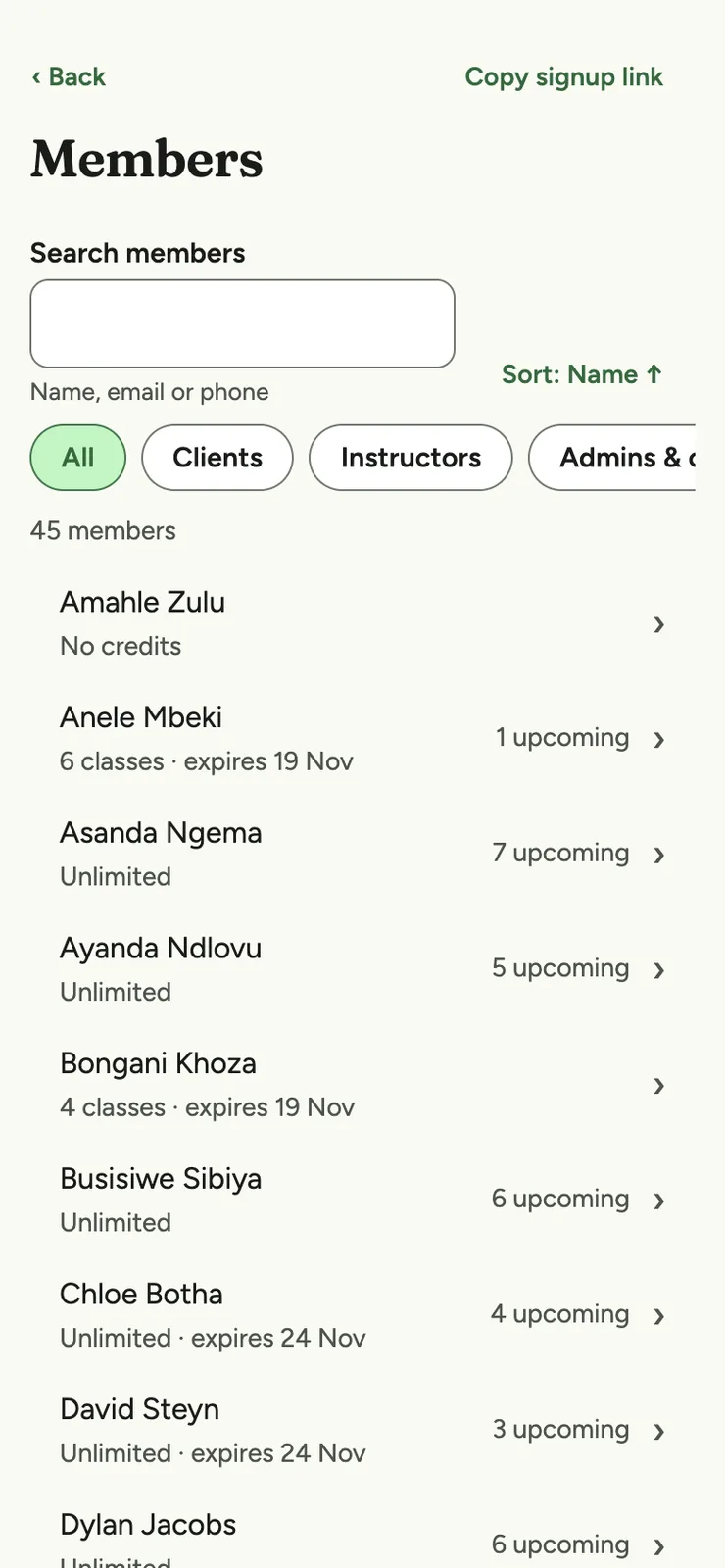
The member list on a phone, with a search box, role filters, each member's classes left, expiry and upcoming bookings, and a Copy signup link button.
Member search
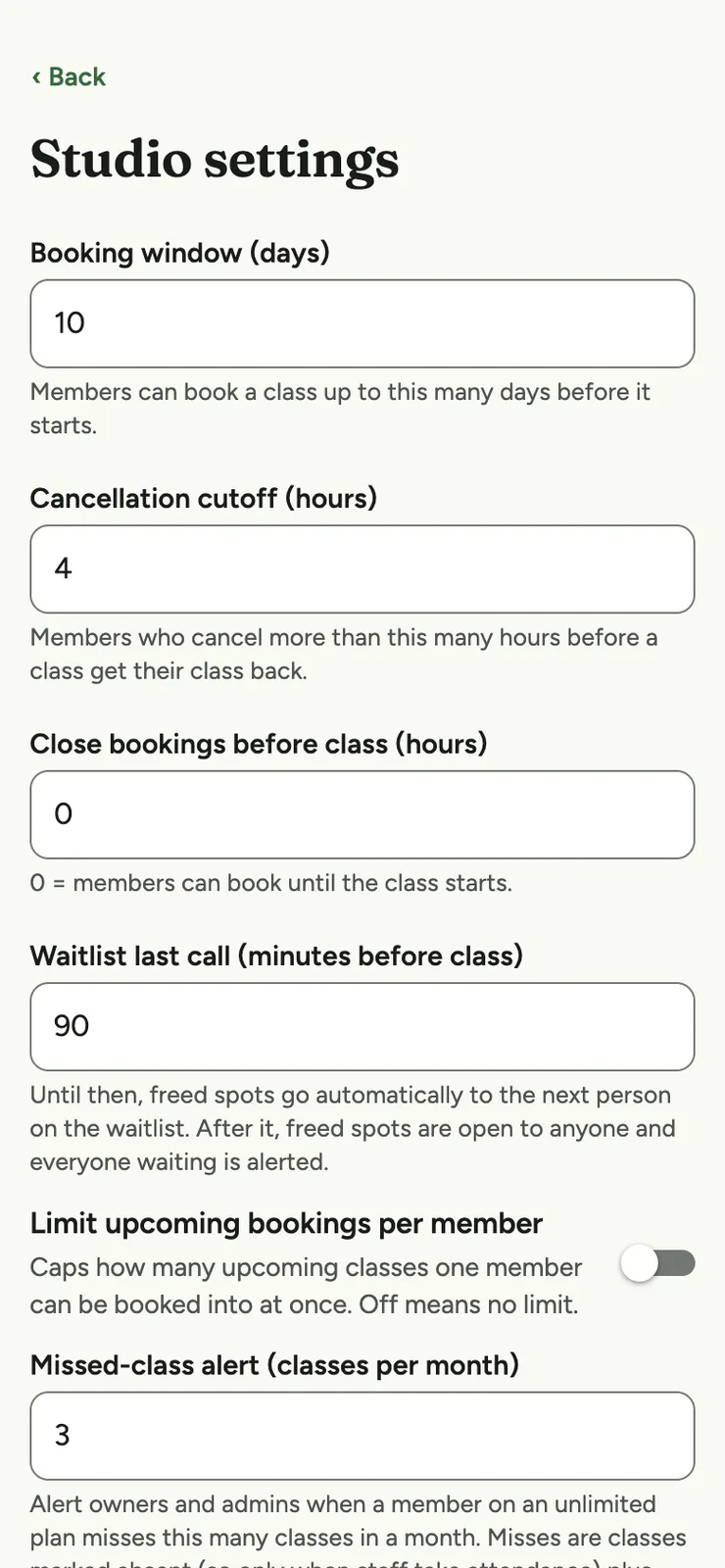
The studio settings on a phone: booking window, cancellation cutoff, when bookings close, waitlist last call, a booking limit and a missed-class alert.
Your rules
The Email this class dialog on a phone, with a subject, a message, an option to also email the waitlist, and how many people it goes to.
Email a class
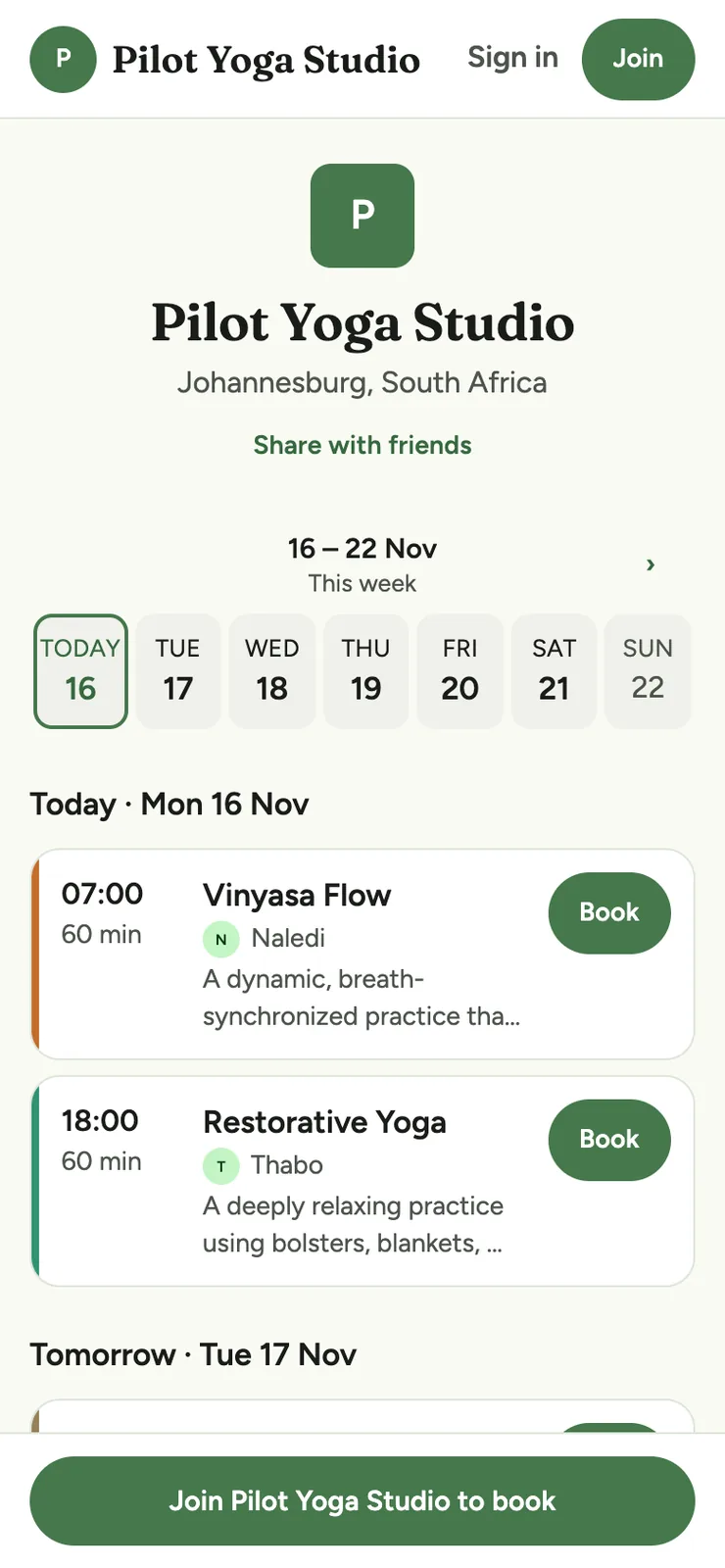
Pilot Yoga Studio's public timetable on a phone, in green, with its monogram and location, a Share with friends link, a week strip, class cards with Book buttons, and Sign in and Join buttons.
Pilot Yoga's branding
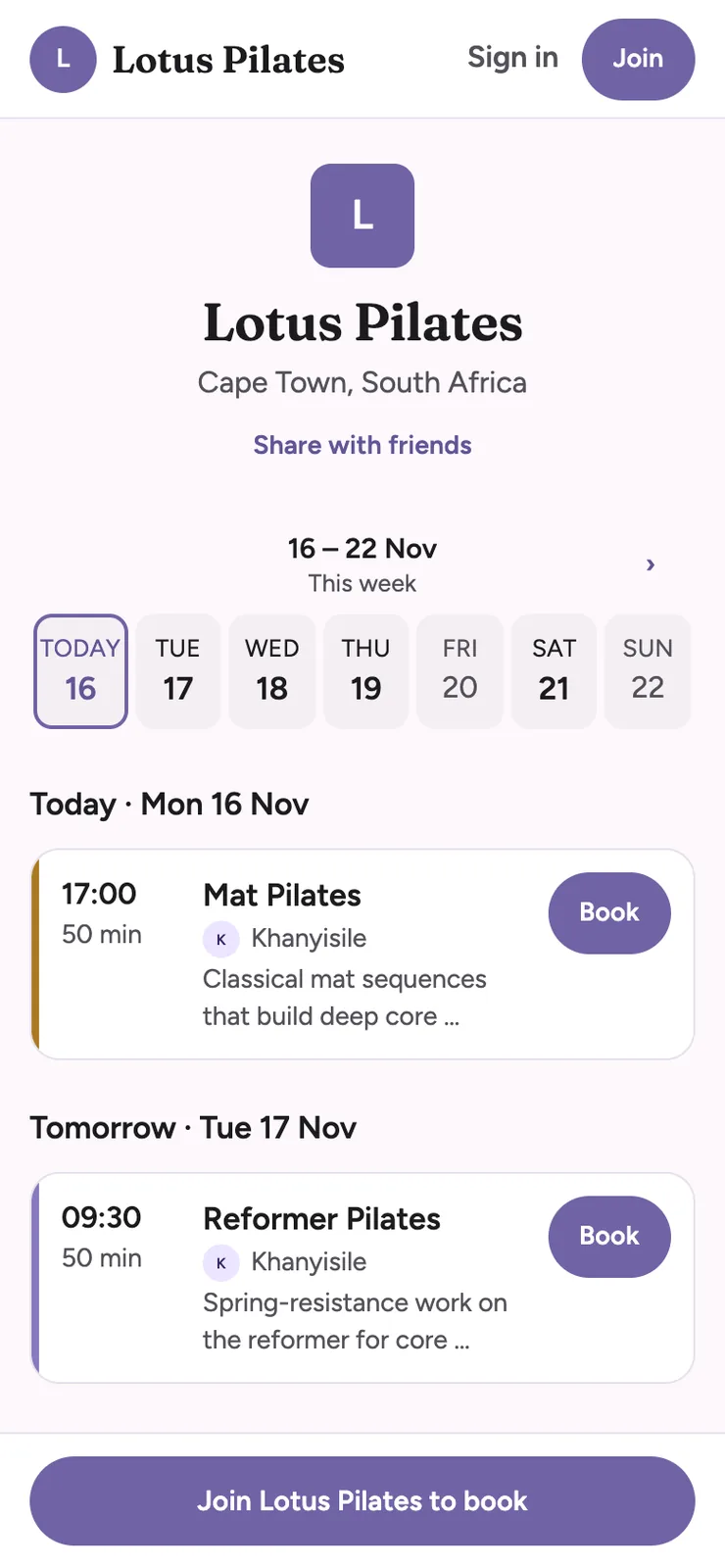
Lotus Pilates's public timetable on a phone, in purple, with its monogram and location, a Share with friends link, a week strip, class cards with Book buttons, and Sign in and Join buttons.
Lotus Pilates' branding
A class's public page on a phone, with its time, instructor, description, spots available, drop-in price, the cancellation rule, a Book this class button and Share with friends.
A class's own page
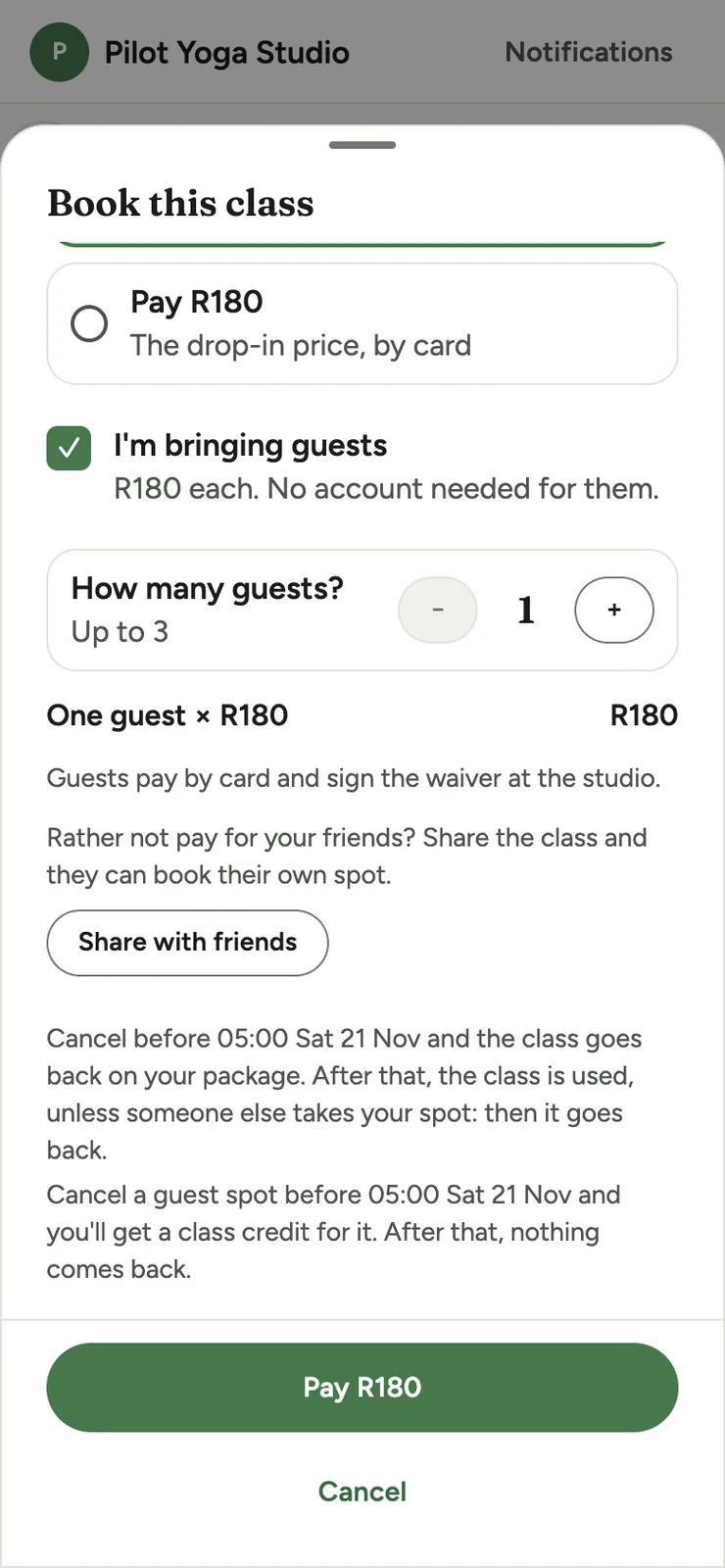
The checkout on a phone with guests ticked: how many guests, the price per guest, Share with friends, the guest cancellation terms and a Pay button.
Bring a friend

Getting started

We'll set it up with you

You won't be left to figure it out on your own. We set up every studio ourselves, together with you.

  1. We have a quick chat

    You tell us how your classes run: your class packs, your cancellation rules and how people pay you today.

  2. We get everything ready

    We load your timetable, class packs, rules, logo and colours, and invite your team. If you'd like online payments, we connect Paystack too.

  3. You share your link

    Send your members the sign-up link, and add your public timetable to Instagram or your website. They sign up and start booking, and you're up and running.

Local

Made in South Africa, for South African studios

Classy is built here, so it fits the way studios here get paid and run their classes.

  • Priced and paid in Rand

    Members can pay by card in Rand through Paystack, and we switch it on studio by studio. Cash and EFT still work, and you approve those packs with one tap.

  • Anywhere in the country

    Classy is online, so a studio in Johannesburg, Pretoria, Cape Town, Durban, Gqeberha or a small town can use it just the same.

  • A local team, set up with you

    You'll talk to a South African team, and we set everything up with you, so you're never left to figure it out alone.

For your members

Your members will love it too

Members can sort out their own bookings whenever it suits them, without waiting for a reply. They book, cancel, buy packs and check how many classes they have left, so they rarely need to message you.

  • Booking at any hour

    A member who decides at 11pm to come to class tomorrow can book right then, without messaging anyone.

  • Buying a pack

    They can pay for a pack online by card, once or monthly, and book straight away. Or they can ask you for a top-up and pay another way.

  • Classes left

    They always know how many classes they have left, booked and used, and when their pack expires.

  • A week at a time

    The schedule shows one week, with buttons for the previous and next week. Each class has a map link and an Add to calendar button.

  • Bring a friend

    If you allow it, they can book a friend onto a class and send them the class link with one tap.

  • Pause when away

    They can ask to pause a monthly membership for a month or two, and it restarts on its own.

Questions

Questions you might have

What devices does it work on?

Classy works in any modern web browser, on a phone, tablet or computer. iOS and Android apps are on the way. It's all one booking system, so a class booked on one device shows up on the others. On a computer, members get a website-style layout with Schedule, My classes and Packages in the header. Your admin keeps its own desktop layout, with a sidebar, an overview dashboard, a members table you can search and sort, a week calendar for classes and reports you can export to CSV.

How do my members pay?

Members buy class packs. They can pay online by card through Paystack, and your share goes straight into your bank account. If you offer a pack monthly, they can choose “Pay monthly” and their card is charged automatically each month. If you take card payments, a member can also pay the drop-in price by card for a single class, and for any guests they bring. Or they can pay you in person or by EFT, and once the money's in, you approve the pack in the app. Use whichever suits you, or all of them.

What kinds of studios and classes does Classy work for?

Classy works for yoga, Pilates and barre studios, gyms and HIIT classes, CrossFit and functional fitness boxes, spin, boxing and martial arts, dance schools, swimming lessons and kids' classes. It also suits pottery, art and cooking workshops. If you run anything with a timetable and sell class packs or monthly memberships, it should fit.

Can members sign a waiver?

Yes. Publish a waiver from Classy's standard South African template, paste in your own text or upload a PDF. Members tick to agree the first time they book or join a waitlist, and they can't book until they do. Each agreement is logged with the waiver version and the time, and you can record a paper signature yourself. The members list and the class roster flag anyone without a valid waiver. When you update your waiver, you choose whether existing members must agree again.

I already have members. Can I bring them across?

Yes. Send them your sign-up link, and they sign in with their email. You can then add class packs to their accounts. When we set you up, we'll talk through how to carry over packs they've already paid for.

How does setup work?

We do it with you. After a quick chat, we load your classes, class packs, rules, logo and colours, and invite your team. If you want online payments, we connect Paystack as well. There are no forms to fill in and nothing for you to build.

What does it cost?

Pricing is in Rand and depends on your studio, so get in touch and we'll give you a straight answer. Online card payments carry Paystack's fee plus a small Classy fee, and we'll explain both up front.

Can members bring a friend?

Yes, if you switch it on. Members can book guests onto a class and pay the drop-in price for each guest by card, so it needs card payments. You choose the most guests one booking can have, and you can give members on unlimited packs a guest discount. Members also get a share button to send a friend the class link.

Is Classy for gym memberships?

Partly. Classy handles monthly class memberships paid by card, and class packs. It doesn't do open-gym access, door access or debit orders. If you need those, talk to us and we'll tell you honestly whether Classy fits.

Is Classy an alternative to Mindbody or Glofox?

Classy is a simpler, South African option that focuses on class booking, class packs and monthly memberships. It's priced in Rand, and members can pay by card through Paystack. It's built for scheduled classes, not everything a gym might run, so see “Is Classy for gym memberships?” above for what it doesn't do.

Let's give you your time back.

We'll show you around the app, hear how your classes run and tell you what it would cost.

Book a demo