For yoga studios in South Africa

Yoga studio booking software, made in South Africa

Students book their spot and buy a class card or monthly pass in Rand. Classy counts the classes, fills the waitlist and keeps the list right, so you can teach instead of answering WhatsApp. We set it up with you.

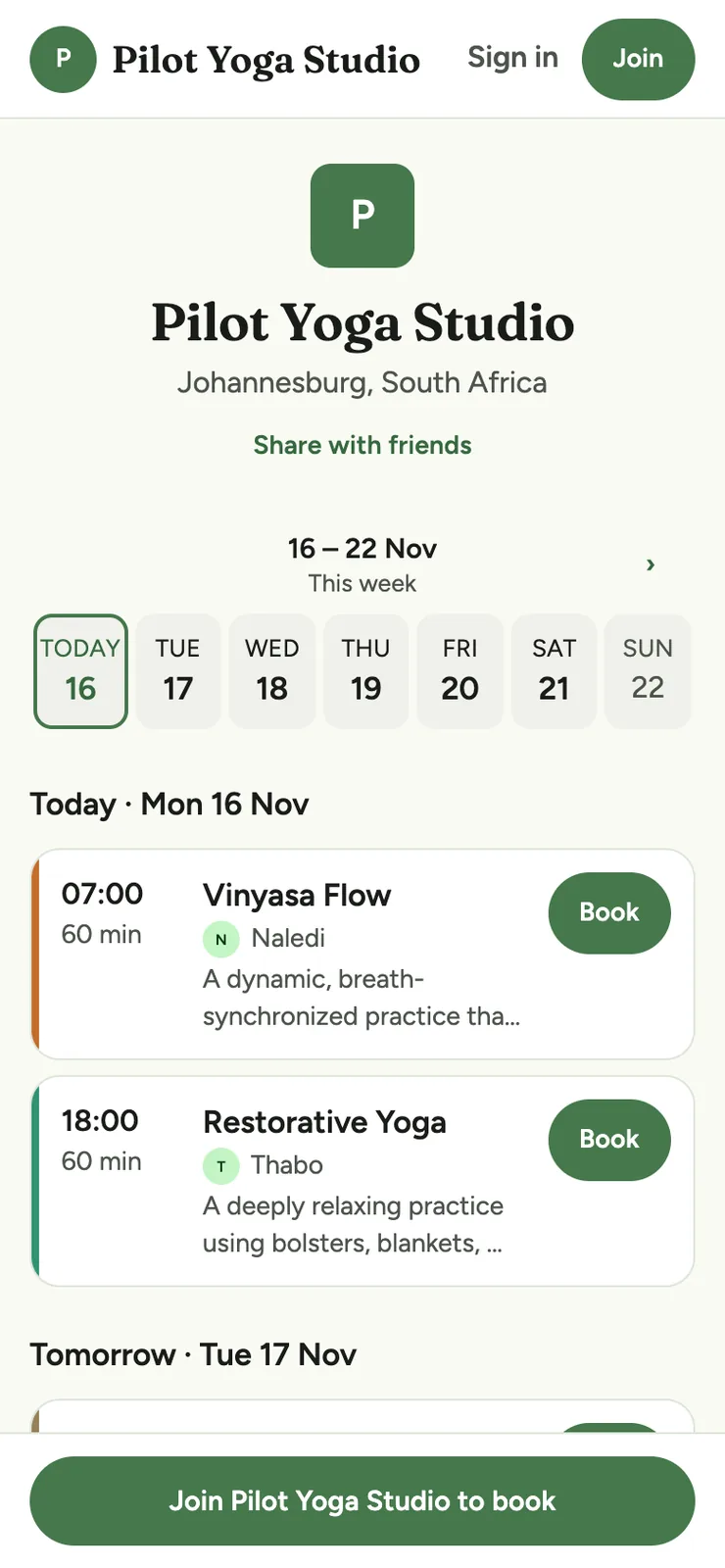
Students book in any web browser, and iOS and Android apps are on the way. Shown: a sample studio's public timetable, in its own name, logo and colours.

The public timetable of Pilot Yoga Studio, a sample studio, on a phone, in green, with its monogram and location, a Share with friends link, a week strip, class cards with Book buttons, and Sign in and Join buttons.

Sound familiar?

The studio admin that happens after class

Most studios here start with WhatsApp and a bank account. It works, until the studio gets busy.

  • The WhatsApp list

    "Is there still space at six?" Someone cancels an hour before, three people reply after it's full, and you're counting heads between poses.

  • "Please send proof of payment"

    One student EFTs on Friday and sends a screenshot. Another paid cash. A third has lost track of how many classes are left on her card.

  • Class cards in a notebook

    Five-class cards, ten-class cards, a few monthly regulars, and expiry dates nobody checks until someone asks.

What you get

How yoga class booking works in Classy

Everything below is in the app today, built around scheduled classes, class cards and monthly passes.

Bookings and waitlist

Students book their own spot, and the waitlist fills itself

Every class has its own number of spots, so a small restorative class and a full vinyasa flow sit on one timetable. Students see what's left and book in a few taps, at any hour.

  • When a class is full, students join the waitlist. When a spot frees up, Classy books the next person in automatically, in queue order, right up to your last call. Last call is a setting: 90 minutes before class unless you change it.
  • Booked in from the waitlist inside your cancellation cutoff? They can still cancel free until class starts. After last call, a freed spot is open to anyone, first come first served, and everyone still on the waitlist is alerted in the app and by email.
  • You decide how far ahead students can book, when bookings close before class (the timetable then shows Bookings closed), and how many classes one student can hold at once.
  • Cancel before your cutoff and the class goes back on the card. Cancel later and it counts as used. Students see the deadline before they book, and booking inside it asks them to confirm first, since cancelling would forfeit the class.
  • Each class has a map link and an Add to calendar button, and students can bring a friend if you switch that on. Guests pay the drop-in price by card.
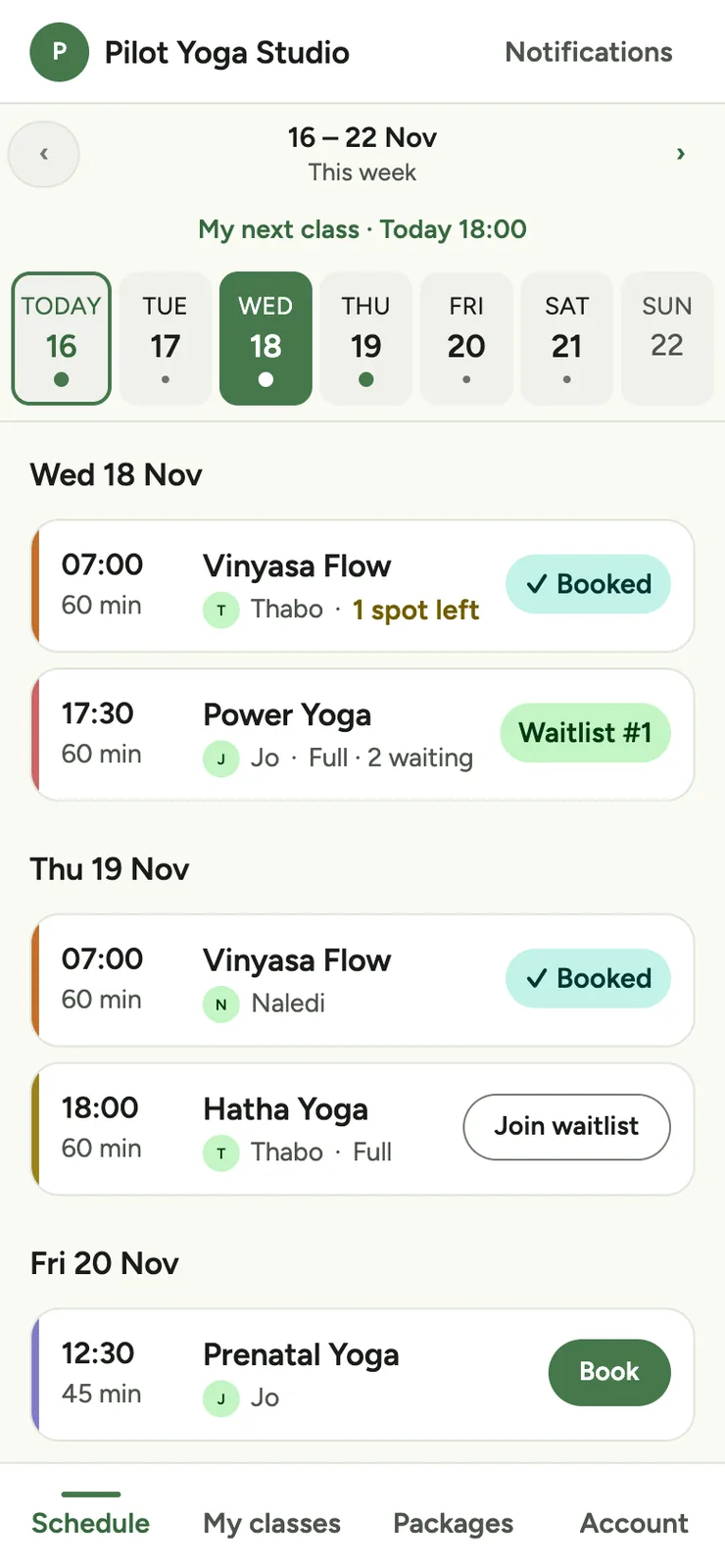
A sample studio's schedule on a phone: one week with a pill for each day and dots on class days, a “My next class” line, then class cards marked Booked, Waitlist, Join waitlist (when full) or Book.
The week's classes
A class on a phone, with its time, instructor, Map and Add to calendar links, description, spots left, the free-cancellation time, the class it uses from the member's pack, and a Book button.
One class

Class cards and passes

Drop-ins, class cards and monthly passes, counted for you

A drop-in for visitors, class packs (your 5- and 10-class cards) and a monthly unlimited pass. Classy takes a class off the card each time a student books.

  • A pack can expire a set number of days after it starts, or never. Students get a reminder email a week before theirs runs out.
  • Pay monthly: offer a pass monthly and the student's card is charged automatically each month through Paystack. If a payment fails, Classy retries over the next five days and lets them know. They can cancel in the app.
  • Students can pick a start date up to 60 days ahead, so a pack bought before a holiday doesn't run down while they're away. They can also ask to pause a monthly pass for one or two months, and you approve it.
  • Paying by EFT or cash? The student requests the pack and you approve it with one tap once you've seen the money in your account.
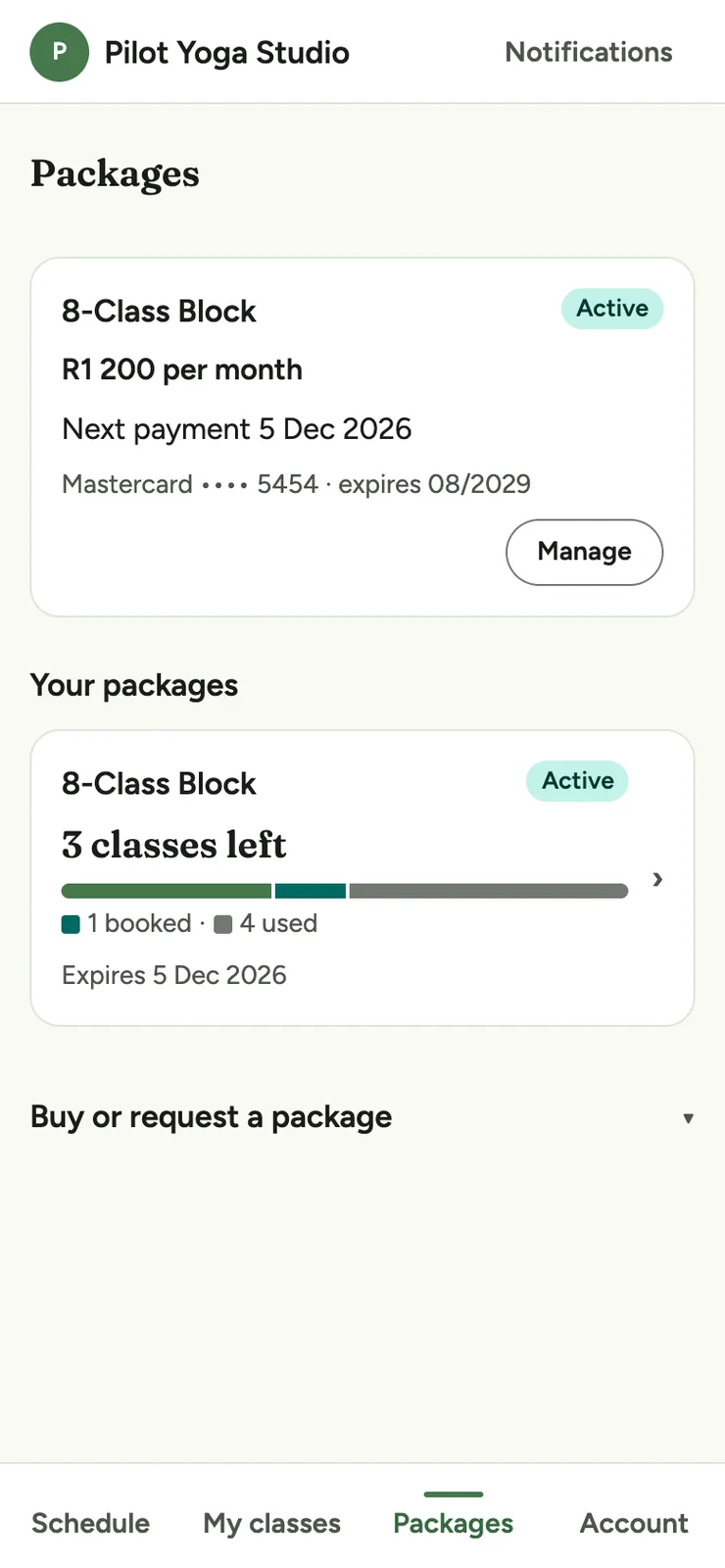
  • Students always see how many classes they have left.
The Packages screen on a phone: a student's active pack with classes left, and the packs to buy, each with its price per class and how much it saves.
What students buy
The Packages screen on a phone, with a student's monthly subscription, its price, next payment date and card on file, a Manage button, and a pack with classes left below.
Paying monthly

Teachers and changes

Teachers and timetable changes, without the group chat

Give every class a teacher. When something changes, Classy tells the students who are booked.

  • Teachers see who's booked, mark who came and add walk-ins. They don't see the money: Reports are for owners and admins.
  • Change a class's teacher or time and everyone booked is emailed. Cancel it and they're emailed too, with your reason if you give one.
  • Post a notice, like a holiday timetable, and students see it at the top of their schedule.
  • Students agree to your waiver the first time they book or join a waitlist, and booking is blocked until they do. Use Classy's standard South African template, your own text or a PDF. Each agreement is logged with the waiver version and time, and the class roster flags anyone without a valid one.
The Classes screen on a phone, with Class types, Closures and New class buttons, Weekly and Upcoming tabs, and the weekly class list.
Your weekly classes

Attendance and income

At the end of the month, the sums are done

Mark who came from the class screen. Card payments go through Paystack, and your share goes straight into your bank account.

  • Look up any student's packs and class history.
  • Reports keep online card sales apart from cash, card, EFT and QR payments at the studio, and break sales down by pack.
  • For every month with sales, we email owners and admins a PDF and CSV statement for your bookkeeper.
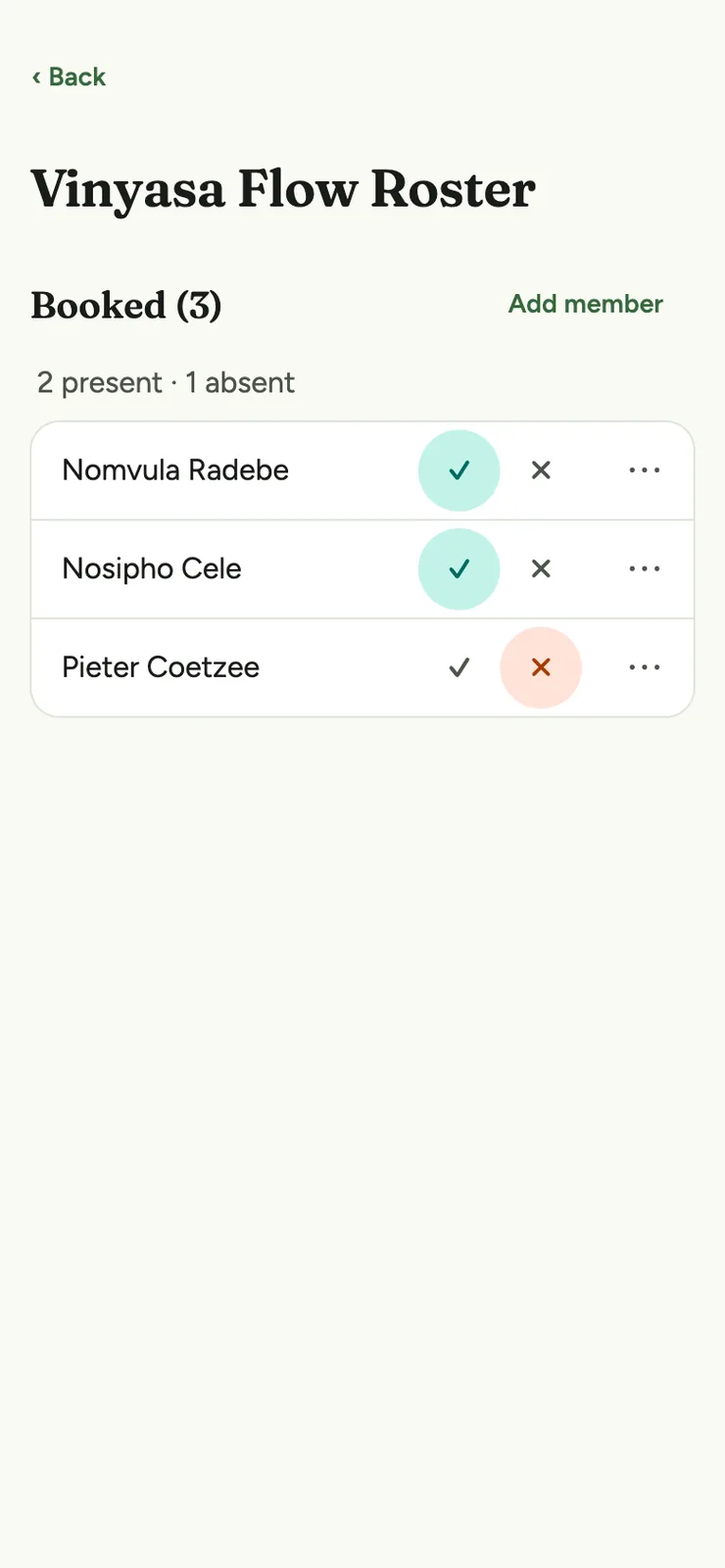
A class roster on a phone, with each booked person marked present or absent and an Add member button.
Who came
The Reports screen on a phone: a month's total sales, online card sales with the payment and Classy fees and the net due, offline sales by method, and sales by package.
Monthly income

Who it's for

Is Classy right for your studio?

A good fit if you

  • Run a weekly timetable of classes with a set number of spots.
  • Sell drop-ins, class cards and monthly passes.
  • Take card, EFT or cash, and want it all counted in one place.

What Classy does well

  • Counts the spots in each class and fills the waitlist for you.
  • Waivers students agree to before they book, logged and flagged on your class roster.
  • Class cards and monthly passes, with Pay monthly charging a card each month.
  • Workshops as one-off classes, with their own teacher and number of spots.
  • Students book in any web browser, with a 6-digit code to sign in and no password to forget.

Made in South Africa

Set up with you, not at you

Rand, Paystack and EFT, and a local team that does the setup with you. You don't build anything.

  1. We have a chat

    Your timetable, your class cards and passes, your cancellation rule, and how students pay you today.

  2. We set it up

    We load your classes, packs, rules, logo and colours, invite your teachers, and connect Paystack if you'd like card payments.

  3. Students sign up from one link

    Share it on Instagram, WhatsApp or your website. Students sign in with their email and book. You teach.

Questions

Yoga studio questions

Is there free yoga studio software?

There are free tools, but Classy doesn't have a free plan. Pricing is in Rand and depends on your studio, and we'll give you a straight answer on a demo. If you only teach a handful of students, a free tool may be enough to start.

Can students pay by EFT, or only by card?

Both. Students can pay by card through Paystack, or pay you by EFT or in person. When the money is in, you approve the pack with one tap. Monthly passes can be charged to a card automatically with Pay monthly.

Do you do debit orders?

Not yet. Today, Pay monthly charges a student's card each month through Paystack. It's a card payment, not a debit order. Debit orders are something we're looking at.

Can I run an intro offer for new students?

Yes. An intro offer can be a cheaper pack of classes, sold like any other. Classy can't limit it to first-timers or to one per student.

What happens when a class is full?

Students can join the waitlist. When a spot frees up, Classy books the next person on the list in automatically, in queue order, right up to your last call. Last call is a setting: 90 minutes before class unless you change it, and you can set anything from 15 minutes to 24 hours. Someone booked in from the waitlist inside your cancellation cutoff can still cancel free until class starts. After last call, a freed spot is open to anyone, first come first served, and everyone still on the waitlist is alerted in the app and by email. Automatic booking needs a class left on a valid pack and an agreed waiver.

Can students sign a waiver?

Yes. Publish a waiver from Classy's standard South African template, paste in your own text or upload a PDF. Students tick to agree the first time they book or join a waitlist, and they can't book until they do. Each agreement is logged with the waiver version and the time, and you can record a paper signature yourself. The members list and the class roster flag anyone without a valid waiver. When you update your waiver, you choose whether existing students must agree again.

I already have students with class cards. How do I move them?

Send them your sign-up link and they sign in with their email. We set your studio up with you and help you get going.

Can I use it for workshops?

A workshop can be a one-off class with its own number of spots and its own teacher. Students book it like any class, so it takes one class from a card, and students on a monthly unlimited pass can book it too. Classy can't charge a separate price for a single workshop.

Can I run private sessions, retreats or teacher trainings?

Not as such. Classy is built for scheduled classes with a set number of spots, so it doesn't take private-session appointments, and it doesn't run retreats or teacher trainings. You can keep handling those the way you do now and run your weekly timetable in Classy.

Do my students have to download an app?

No. Classy works in any modern web browser on a phone, tablet or computer, and iOS and Android apps are on the way. Students sign in with a 6-digit code sent to their email, so there's no password to forget. You can also add someone to a class yourself.

Can students choose their own mat position?

No. Classy counts the spots in each class and stops bookings when it's full, but it doesn't assign a place in the room.
Less admin, more time on the mat.

We'll show you around the app, hear how your classes run and tell you what it would cost.

Book a demo